

Phiên bản mới nhất
Phiên bản
11.1.2
11.1.2
Cập nhật
tháng 7 20, 2025
tháng 7 20, 2025
Nhà phát triển
Nexech
Nexech
Danh mục
Tools
Tools
Nền tảng
Android
Android
Lượt tải
0
0
Giấy phép
Free
Free
Tên gói
com.aospstudio.care
com.aospstudio.care
Báo cáo
Báo lỗi
Báo lỗi
Tìm hiểu thêm về Device Care: Device Health
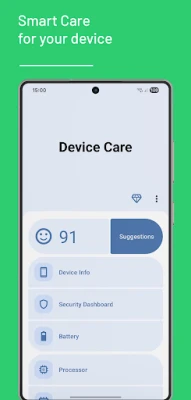
Device Care is a useful information and analysis tool designed to help you understand and track the general status of your Android device. It provides technical data about your device to help you make informed decisions regarding its performance and security.
Smart Analysis & Suggestions
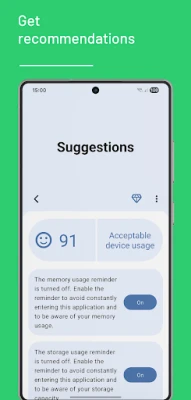
View your device's overall health with a score and get suggestions on potential areas for improvement to help your system run more efficiently. Device Care can alert you when memory and storage usage reach certain levels, allowing you to be proactively informed about potential slowdowns.
Security Dashboard
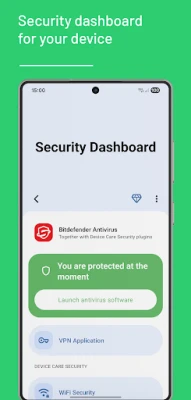
Get an overview of your security status. This section is designed to provide quick access to security applications or plugins, such as antivirus software, that you have installed on your device. You can launch your existing security software from here and access related settings like Wi-Fi security.
Monitor Performance Data
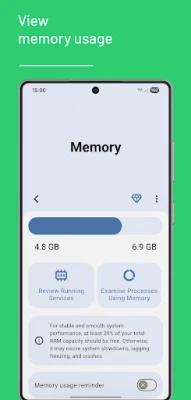
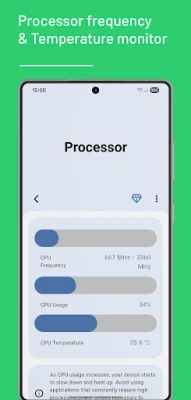
Keep a close eye on your device's hardware. View your processor's (CPU) frequency, real-time usage, and temperature to stay informed about the risks of overheating and performance degradation. Examine your memory (RAM) usage to identify which apps and services are consuming the most resources.
Know Your Device
See your device's technical specifications in one place. Easily access hardware details like manufacturer, model, screen resolution, and processor in the "Device Info" section.
Transparency & Permissions
Our app provides reminders to alert you about things like memory and storage usage. For these reminders to work reliably and on time, even when the app is in the background, we require the 'Foreground Service' permission. This is used exclusively to ensure your scheduled reminders function without interruption, with full respect for your device's privacy.
User-Friendly Interface
Personalize the app's interface by choosing between a clean light theme or a sleek Dark Mode, which offers comfortable viewing on AMOLED screens.
View your device's overall health with a score and get suggestions on potential areas for improvement to help your system run more efficiently. Device Care can alert you when memory and storage usage reach certain levels, allowing you to be proactively informed about potential slowdowns.
Security Dashboard
Get an overview of your security status. This section is designed to provide quick access to security applications or plugins, such as antivirus software, that you have installed on your device. You can launch your existing security software from here and access related settings like Wi-Fi security.
Monitor Performance Data
Keep a close eye on your device's hardware. View your processor's (CPU) frequency, real-time usage, and temperature to stay informed about the risks of overheating and performance degradation. Examine your memory (RAM) usage to identify which apps and services are consuming the most resources.
Know Your Device
See your device's technical specifications in one place. Easily access hardware details like manufacturer, model, screen resolution, and processor in the "Device Info" section.
Transparency & Permissions
Our app provides reminders to alert you about things like memory and storage usage. For these reminders to work reliably and on time, even when the app is in the background, we require the 'Foreground Service' permission. This is used exclusively to ensure your scheduled reminders function without interruption, with full respect for your device's privacy.
User-Friendly Interface
Personalize the app's interface by choosing between a clean light theme or a sleek Dark Mode, which offers comfortable viewing on AMOLED screens.
Đánh giá ứng dụng
Thêm bình luận & đánh giá
Đánh giá người dùng
Dựa trên 0 đánh giá
Chưa có đánh giá nào.
Bình luận sẽ không được duyệt nếu là SPAM, lạm dụng, lạc đề, dùng từ ngữ thô tục, công kích cá nhân, hoặc kích động thù ghét.














Xem thêm »

Ứng dụng phổ biến

Zalopay Thanh Toán Tích ThưởngZION JOINT STOCK COMPANY

FacebookMeta Platforms, Inc.

YouTubeGoogle LLC

Adobe Scan: Quét tài liệu, ảnhAdobe

ZaloZalo Group

Rakuten Viber MessengerViber Media

VNeIDTrung tâm dữ liệu quốc gia về dân cư

Duolingo: Học ngoại ngữDuolingo

MessengerMeta Platforms, Inc.

GPS định vị & theo dõi vị tríANKO Solutions LLC
Xem thêm »
Lựa chọn của biên tập viên
Adobe Scan: Quét tài liệu, ảnhAdobe

YouTube Kids 5Google LLC
YouTubeGoogle LLC
Duolingo: Học ngoại ngữDuolingo
VNeIDTrung tâm dữ liệu quốc gia về dân cư
Zalopay Thanh Toán Tích ThưởngZION JOINT STOCK COMPANY
ZaloZalo Group
FacebookMeta Platforms, Inc.
Rakuten Viber MessengerViber Media

WhatsApp BusinessWhatsApp LLC