

Phiên bản mới nhất
Phiên bản
1.9.1.7
1.9.1.7
Cập nhật
tháng 7 23, 2025
tháng 7 23, 2025
Nhà phát triển
JLab Audio
JLab Audio
Danh mục
Tools
Tools
Nền tảng
Android
Android
Lượt tải
0
0
Giấy phép
Free
Free
Tên gói
com.jlab.app
com.jlab.app
Báo cáo
Báo lỗi
Báo lỗi
Tìm hiểu thêm về JLab
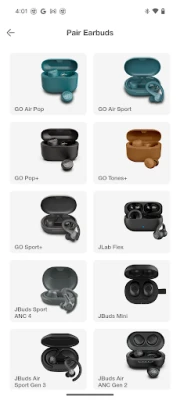
Compatible Models:
GO Pop+
GO Sport+
JBuds Air Pro
JBuds Air Pro ANC
JBuds Air ANC (Gen 2)
JBuds ANC 3
JBuds Air Sport (Gen 3)
JBuds Mini
Work Buds
Epic Air ANC (Gen 2)
Epic Air Sport (Gen 2)
Epic Lab Edition
GO Work (Gen 2)
JBuds Lux ANC
JBuds Sport ANC 4
Rewind 2
Flex
Studio+
Studio Pro+
Epic Work ANC
JBuds Open Sport
GO Pop ANC
Epic Sport ANC 3
Epic Open Sport
GO Pods ANC
JBuds Pods ANC
GO Lux ANC
Epic Lux Lab Edition
Studio 2
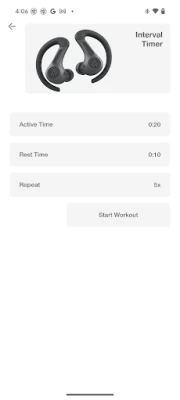
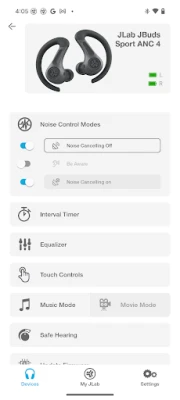
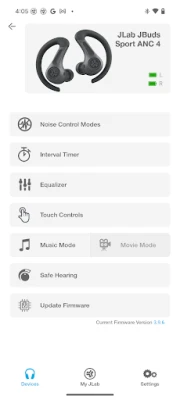
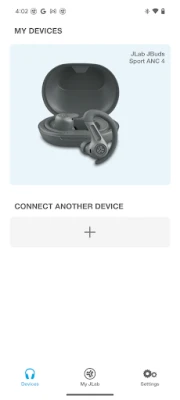
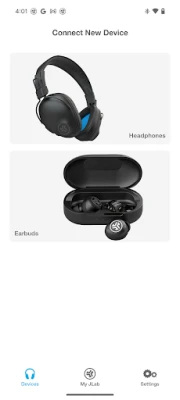
The new and improved JLab app offers complete customization for all JLab App compatible models. Adjust Noise Control settings, Be Aware, touch controls, safe listening levels, and sound to your personal preference – or use the presets for JLab Signature, Balanced, or Bass Boost. Plus, get software updates for your product right when they’re available.
Active Noise Cancellation Control
With the new JLab App, you'll be able to increase the active noise canceling from off all the way to max ANC, (on your ANC compatible earbuds) while in the earbuds themselves you can only select on or off.
Be Aware Audio
Bring the outside in. Use the JLab App to increase or decrease the amount of outside noise you let in by adjusting your Be Aware settings. (For Be Aware Compatible earbuds only)
EQ Customization
Fine tune your sound by adjusting the equalizer settings. JLab products come set with three default settings - called Custom EQ3 Sound, which features JLab Signature, Balanced and Bass Boost and a 4th option 'Custom'. Use the JLab App to test and set your own equalizer settings by adjusting Bass (200, 280, 400 Hz levels), Mid-Range (550, 770, 1000, 2000 Hz levels) and Treble (4000, 8000, 16000 Hz levels).
Custom Controls
JLab products come with controls in each earbud that control anything from volume, track changes, play/pause and more. If you'd like to switch the settings, you can customize your controls further via the app.
Safe Hearing
All future JLab models will now support Safe Hearing. Switch between the default output, 95 dB, or 85 dB for a safe listening experience.
GO Sport+
JBuds Air Pro
JBuds Air Pro ANC
JBuds Air ANC (Gen 2)
JBuds ANC 3
JBuds Air Sport (Gen 3)
JBuds Mini
Work Buds
Epic Air ANC (Gen 2)
Epic Air Sport (Gen 2)
Epic Lab Edition
GO Work (Gen 2)
JBuds Lux ANC
JBuds Sport ANC 4
Rewind 2
Flex
Studio+
Studio Pro+
Epic Work ANC
JBuds Open Sport
GO Pop ANC
Epic Sport ANC 3
Epic Open Sport
GO Pods ANC
JBuds Pods ANC
GO Lux ANC
Epic Lux Lab Edition
Studio 2
The new and improved JLab app offers complete customization for all JLab App compatible models. Adjust Noise Control settings, Be Aware, touch controls, safe listening levels, and sound to your personal preference – or use the presets for JLab Signature, Balanced, or Bass Boost. Plus, get software updates for your product right when they’re available.
Active Noise Cancellation Control
With the new JLab App, you'll be able to increase the active noise canceling from off all the way to max ANC, (on your ANC compatible earbuds) while in the earbuds themselves you can only select on or off.
Be Aware Audio
Bring the outside in. Use the JLab App to increase or decrease the amount of outside noise you let in by adjusting your Be Aware settings. (For Be Aware Compatible earbuds only)
EQ Customization
Fine tune your sound by adjusting the equalizer settings. JLab products come set with three default settings - called Custom EQ3 Sound, which features JLab Signature, Balanced and Bass Boost and a 4th option 'Custom'. Use the JLab App to test and set your own equalizer settings by adjusting Bass (200, 280, 400 Hz levels), Mid-Range (550, 770, 1000, 2000 Hz levels) and Treble (4000, 8000, 16000 Hz levels).
Custom Controls
JLab products come with controls in each earbud that control anything from volume, track changes, play/pause and more. If you'd like to switch the settings, you can customize your controls further via the app.
Safe Hearing
All future JLab models will now support Safe Hearing. Switch between the default output, 95 dB, or 85 dB for a safe listening experience.
Đánh giá ứng dụng
Thêm bình luận & đánh giá
Đánh giá người dùng
Dựa trên 0 đánh giá
Chưa có đánh giá nào.
Bình luận sẽ không được duyệt nếu là SPAM, lạm dụng, lạc đề, dùng từ ngữ thô tục, công kích cá nhân, hoặc kích động thù ghét.












Xem thêm »

Ứng dụng phổ biến

FacebookMeta Platforms, Inc.

Zalopay Thanh Toán Tích ThưởngZION JOINT STOCK COMPANY

YouTubeGoogle LLC

Adobe Scan: Quét tài liệu, ảnhAdobe

ZaloZalo Group

VNeIDTrung tâm dữ liệu quốc gia về dân cư
Rakuten Viber MessengerViber Media

MessengerMeta Platforms, Inc.

Duolingo: Học ngoại ngữDuolingo

GPS định vị & theo dõi vị tríANKO Solutions LLC
Xem thêm »
Lựa chọn của biên tập viên
Adobe Scan: Quét tài liệu, ảnhAdobe

YouTube Kids 5Google LLC
YouTubeGoogle LLC
Duolingo: Học ngoại ngữDuolingo
VNeIDTrung tâm dữ liệu quốc gia về dân cư
Zalopay Thanh Toán Tích ThưởngZION JOINT STOCK COMPANY
ZaloZalo Group
FacebookMeta Platforms, Inc.
Rakuten Viber MessengerViber Media

WhatsApp BusinessWhatsApp LLC