

Phiên bản mới nhất
Phiên bản
27.0
27.0
Cập nhật
tháng 7 21, 2025
tháng 7 21, 2025
Nhà phát triển
Photo and video applications
Photo and video applications
Danh mục
Tools
Tools
Nền tảng
Android
Android
Lượt tải
0
0
Giấy phép
Free
Free
Tên gói
smart.calculator.gallerylock
smart.calculator.gallerylock
Báo cáo
Báo lỗi
Báo lỗi
Tìm hiểu thêm về Photo, Video Locker-Calculator
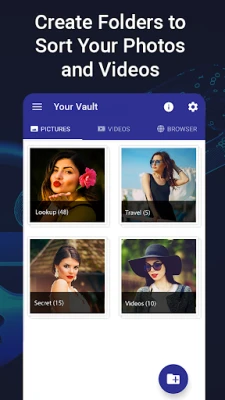
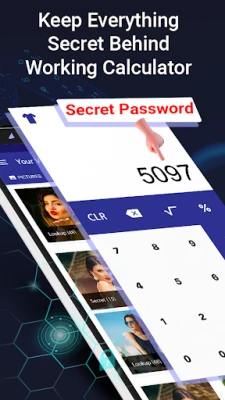
Calculator is the Vault app can secretly Hide Pictures, Hide Videos without anyone knowing as gallery lock installed in your phone looks like just a regular calculator. Your files will be secretly stored in a vault and can only be viewed after a Numeric PIN is entered on calculator panel of this app.
Also, this Photo Locker can be used as regular calculator for daily use.
How to use
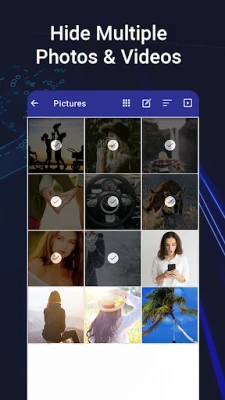
✔ Hide Pictures and Videos : Click on Plus Button at the bottom of main screen and then select media from gallery and click lock button to hide into Photo hide and Video Locker - Calculator app.
✔ Fingerprint unlock: you can enable your fingerprint settings to unlock it without password instantly for your smart hide calculator.
Features:
• Access Photo & Video Locker by typing Numeric PIN on calculator panel of this app.
• Support all Picture formats in gallery lock like GIF, JPEG, PNG etc.
• Beautiful color themes for calculator and the vault.
• Easy to Manage, Delete, Unhide, Move Pictures in gallery safe vault.
• Amazing Inbuilt Image viewer with Slide show, Rotate, Share and Shuffle option.
• Powerful and Instant Lock system to keep safe your private media.
• Fingerprints unlock for calculator for supported devices.
• Dark Mode feature helps to safe open personal photo, video locker during night with Dark theme.
• Latest Material Design with easy-to-use interface.
USEFUL TIPS :
✔ Forget Password? Recover Password by your registered e-mail id and regain access to the app.
✔ Change PIN? Go to Settings tab and click on Change Password.
✔ Unlock Media? After you Hide pictures and Videos from this gallery lock, use unlock button in this app to unhide media whenever needed.
✔ Relax and View Images? Use Slideshow option and set slide interval from settings.
✔ Beautify? Use Theme icon to change color of Lock Screen so you don’t get bored.
FAQ:
Q: Forgot my password. How to Reset?
A: Enter 8888 number in Calculator and press EQUAL (=) button. password recovery screen will open.
Q: I uninstalled app and my locked photos gone. Can I recover?
A: No, you cannot. once you uninstalled app without restoring files back to your gallery, you will lose locked files forever. re installing cannot recover those deleted files.
Any Suggestion or Feedback?
email: photovideoapps@gmail.com
How to use
✔ Hide Pictures and Videos : Click on Plus Button at the bottom of main screen and then select media from gallery and click lock button to hide into Photo hide and Video Locker - Calculator app.
✔ Fingerprint unlock: you can enable your fingerprint settings to unlock it without password instantly for your smart hide calculator.
Features:
• Access Photo & Video Locker by typing Numeric PIN on calculator panel of this app.
• Support all Picture formats in gallery lock like GIF, JPEG, PNG etc.
• Beautiful color themes for calculator and the vault.
• Easy to Manage, Delete, Unhide, Move Pictures in gallery safe vault.
• Amazing Inbuilt Image viewer with Slide show, Rotate, Share and Shuffle option.
• Powerful and Instant Lock system to keep safe your private media.
• Fingerprints unlock for calculator for supported devices.
• Dark Mode feature helps to safe open personal photo, video locker during night with Dark theme.
• Latest Material Design with easy-to-use interface.
USEFUL TIPS :
✔ Forget Password? Recover Password by your registered e-mail id and regain access to the app.
✔ Change PIN? Go to Settings tab and click on Change Password.
✔ Unlock Media? After you Hide pictures and Videos from this gallery lock, use unlock button in this app to unhide media whenever needed.
✔ Relax and View Images? Use Slideshow option and set slide interval from settings.
✔ Beautify? Use Theme icon to change color of Lock Screen so you don’t get bored.
FAQ:
Q: Forgot my password. How to Reset?
A: Enter 8888 number in Calculator and press EQUAL (=) button. password recovery screen will open.
Q: I uninstalled app and my locked photos gone. Can I recover?
A: No, you cannot. once you uninstalled app without restoring files back to your gallery, you will lose locked files forever. re installing cannot recover those deleted files.
Any Suggestion or Feedback?
email: photovideoapps@gmail.com
Đánh giá ứng dụng
Thêm bình luận & đánh giá
Đánh giá người dùng
Dựa trên 0 đánh giá
Chưa có đánh giá nào.
Bình luận sẽ không được duyệt nếu là SPAM, lạm dụng, lạc đề, dùng từ ngữ thô tục, công kích cá nhân, hoặc kích động thù ghét.















Xem thêm »

Ứng dụng phổ biến

Zalopay Thanh Toán Tích ThưởngZION JOINT STOCK COMPANY

FacebookMeta Platforms, Inc.

YouTubeGoogle LLC

Adobe Scan: Quét tài liệu, ảnhAdobe

ZaloZalo Group

Rakuten Viber MessengerViber Media

VNeIDTrung tâm dữ liệu quốc gia về dân cư

Duolingo: Học ngoại ngữDuolingo

MessengerMeta Platforms, Inc.

GPS định vị & theo dõi vị tríANKO Solutions LLC
Xem thêm »
Lựa chọn của biên tập viên
Adobe Scan: Quét tài liệu, ảnhAdobe

YouTube Kids 5Google LLC
YouTubeGoogle LLC
Duolingo: Học ngoại ngữDuolingo
VNeIDTrung tâm dữ liệu quốc gia về dân cư
Zalopay Thanh Toán Tích ThưởngZION JOINT STOCK COMPANY
ZaloZalo Group
FacebookMeta Platforms, Inc.
Rakuten Viber MessengerViber Media

WhatsApp BusinessWhatsApp LLC